
Six Levels of Working With AI
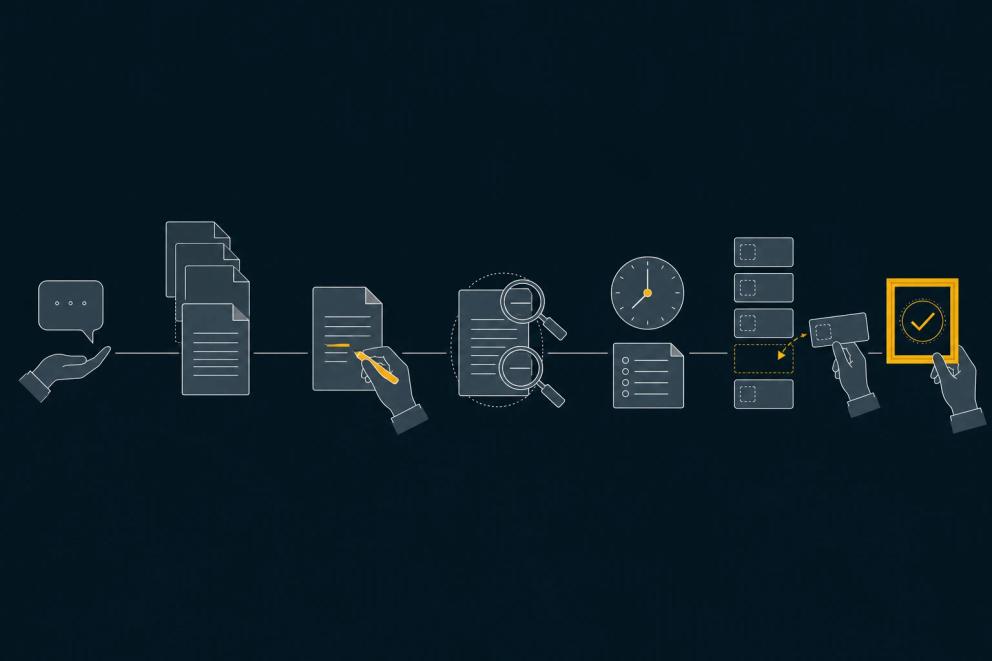
For your monthly report, AI can answer a question, read figures from your systems or prepare the whole report. These are different ways of working with AI.
At a manufacturer of CNC automation, the managing director uses several of these ways at once. For a market analysis, he asks Copilot in a chat. Copilot answers questions about company documents from selected SharePoint libraries. AI prepares incoming invoices as drafts, and his team approves them. We develop the financial planning there with AI: the AI builds the report, interprets the figures and finds errors in the reporting. He checks the results. Asking in a chat is as much part of how he works with AI as finding errors in the financial planning.
We distinguish six levels: Fragen, Anbinden, Begleiten, Abgeben, Laufen lassen and Ziele setzen. They describe how you work with AI yourself. You might supervise the steps of a new task while a familiar report is already being produced independently. The right level depends on the task.
With every level, the controls grow too. From the fourth level, nobody watches every step. Results therefore need more built-in checks. We put those controls in place as part of the work. They make the next step safer and give you a basis for approval.
The six levels at a glance
- Fragen (ask): AI replies in a chat. You read and check the answer yourself.
- Anbinden (connect): AI reads company data with limited permissions and cites its sources.
- Begleiten (supervise): AI edits data and documents. You approve every change.
- Abgeben (delegate): AI completes a whole assignment. Automatic checks and a second AI review it before your approval.
- Laufen lassen (let it run): AI starts at a set time or in response to an event. Logs and result checks are part of the arrangement.
- Ziele setzen (set goals): AI recognises what needs doing and files tasks itself. You define the area and see every task.
We follow the same tasks through the levels: the monthly management report and a quotation. The report illustrates work we know from financial planning. The individual workflows below are examples of each level. The quotation remains a hypothetical example of AI use. At the manufacturer mentioned above, quotations are produced through fixed automation.
1. Fragen: ask
You ask AI a question in a chat. It may also search the web or read an uploaded file. Its answer initially stays in the conversation. You decide what is correct and what to use.
For the monthly report, you might upload an approved analysis and ask for an explanation of a variance. For a quotation, you ask for a draft based on your notes. You check the figures against the analysis and the quotation text against the enquiry. AI needs no access to your live systems for this.
The next step becomes useful when you repeatedly gather and upload the same documents for the same task. A connection can make the current sources directly available.
2. Anbinden: connect
AI reads the data and documents you have made available for the task. It may see only what the employee using it is allowed to see. Its answer cites its sources. At this level, it cannot change the data yet.
For the monthly report, it reads the current data and the accompanying notes. It can answer a question about a line item and show where the figure comes from. For the quotation, it reads the enquiry, product documents and current templates. It identifies missing information. It reads prices and delivery dates from the designated sources or leaves them open.
A sign that the next step would help: the answers are useful, but you then copy them by hand into the same spreadsheet or document. Before AI can write there, we define which changes are allowed and who approves them.
3. Begleiten: supervise
AI can edit company data and documents. You see each proposed change and approve it before it is applied. Its write permissions are limited to the files and fields it needs, and the limit sits in its access, not in its instructions.
In the monthly report, AI proposes an addition to the explanation of a variance. You check the source and approve the change to the report. In the quotation, it inserts an appropriate description of the work from the template. You approve the entry and check that it matches the enquiry. This does not give AI permission to change the price list.
The next step fits when the assignment recurs and a correct result can be clearly recognised. Rules, sources and exceptions need to be established well enough for checks to replace ongoing supervision. One successful attempt is not enough.
AI inside Excel, Word or Outlook has no level of its own. If it only reads, the work belongs to Anbinden. If it edits the file under your supervision, it belongs to Begleiten.
4. Abgeben: delegate
You ask AI for the whole result. It creates and edits the necessary documents independently within its limited permissions. The result then comes to you for review and approval.
Controls grow particularly strongly here: prices, figures and dates come from your systems and templates. AI does not invent them. Missing values stay open and are flagged. Automatic checks can verify totals and required fields. A second AI reviews the draft independently. Both help you assess the result; they do not replace your approval. AI's access cannot send anything by itself.
For the monthly report, the assignment is to produce the report from approved data and explain variances. Calculation checks compare the figures with the sources. The second AI checks whether those figures support the explanations. You receive the report with sources and open questions. For the quotation, the description of the work and the quotation document are produced from the enquiry, template and stored prices. Unclear quantities or dates come to you as questions. You decide on the quotation and whether to send it.
The next step makes sense when the same assignment recurs regularly or a clear event triggers it. You can then hand over the start as well. The result checks remain.
5. Laufen lassen: let it run
AI begins without a new instruction. A set time or an event starts the work. Logs record what ran, which sources were used and where the workflow stopped. Errors and missing information become visible rather than passing unnoticed into the next step.
The monthly report can start once the month-end close is approved. It then waits for your approval with sources, check results and open points. In the hypothetical quotation example, a new enquiry triggers the draft. AI presents it for review. It does not send it itself, because its access cannot send.
At this level, every result is checked by default. Less review becomes an option only after reliability has been demonstrated for that particular task. Sampling is a justified exception. Anything leaving the company still needs a person's approval.
The next step makes sense when the results keep revealing follow-up work that nobody assigned: a variance that needs an explanation or an enquiry that has been left waiting. You can then give AI a goal and an area instead of individual assignments.
6. Ziele setzen: set goals
You give AI a goal and an area instead of individual assignments. It recognises what the goal requires, files tasks and starts them. The result checks from the previous levels remain.
You define the area in which AI may file tasks. Every task appears in a list that you can see and change. There you can drop a task, postpone it or move it forward. Anything leaving the company still needs your approval.
While preparing the monthly report, AI notices an unusual variance. It files a task to find the cause and delivers the analysis with the report. In the hypothetical quotation example, it notices that a quotation has gone unanswered for ten days. It files a follow-up task and prepares the message. It does not send it itself.
We work this way in our own software development. A regular run evaluates the error reports of the applications we look after. AI fixes small errors itself. For larger ones, it files tasks. Once we approve one, further AI agents work on it. Every change goes through checks, and a person decides whether it goes live.
The next useful step here is widening the area or improving a check. Not every task has to reach this level.
Which task is worth taking a step further
The next step pays off for a task where you repeat the same manual work. You collect the same documents every time, copy answers into the same document by hand or give the same assignment again and again. One step further takes that manual work off your hands. The controls that belong to it are described under each level above.
The other tasks stay where they are. A new task can start with Fragen. Some tasks stay at Begleiten because your judgment is needed for every change. A managing director who has reports produced independently still asks questions in a chat when considering a new decision.
Having AI start the work or file its own tasks does not yet define what it may decide. Together with you, we decide who checks and who approves each step of the task. Our article on using AI in your business explains how a task becomes a suitable use of AI.
Sometimes the existing tool, the right sources and clear instructions are enough for the next step. Where a fixed rule decides the case, fixed automation fits. Where cases differ, an AI agent may be useful. Through coaching, consulting and implementation for getting started with AI, we help you and your team use the right level in your own work.